
Every SIM card sold in Pakistan is supposed to be linked to a real person. That person’s identity — confirmed through their Computerized National Identity Card — is the anchor that connects a mobile number to a name, an address, and an individual. The system makes sense on paper. In practice, however, it has gaps. SIM cards get registered fraudulently. Retailers sometimes activate SIMs using CNIC numbers that don’t belong to the buyer. Identity documents get copied, lost, or misused. And ordinary people often have no idea that their CNIC has been used to register mobile numbers they’ve never touched.
This guide covers how to check SIM ownership by CNIC number in 2026 — both checking which SIMs are registered under your own CNIC, and looking up the registration details behind an unknown number that may have come your way. These are two related but distinct things, and understanding both gives you meaningful control over your mobile identity and your personal security.
Why SIM Ownership Verification Matters in 2026
The short answer: SIM-linked fraud is not slowing down.
Across Pakistan and similar markets where SIM registration is tied to national identity documents, the volume of complaints related to unauthorized SIM activation has grown steadily. Fraudsters use other people’s CNICs to register SIM cards, then use those numbers for a range of illegal activities — scam calls, bank account takeovers, one-time password interceptions, and criminal communications. When the trail is investigated, it leads back to an innocent person’s CNIC.
For the person whose identity was used, the consequences can range from inconvenient to severe. At the mild end, they might get flagged in a system check or have their mobile services disrupted. At the serious end, they could be associated with financial fraud or criminal communications they had nothing to do with. Clearing up an unauthorized SIM registration after the fact takes time, requires formal complaints through multiple agencies, and doesn’t always undo the damage that’s already been done.
The only effective defence is knowing what’s registered under your name — ideally before problems start, but at any point as soon as you check.
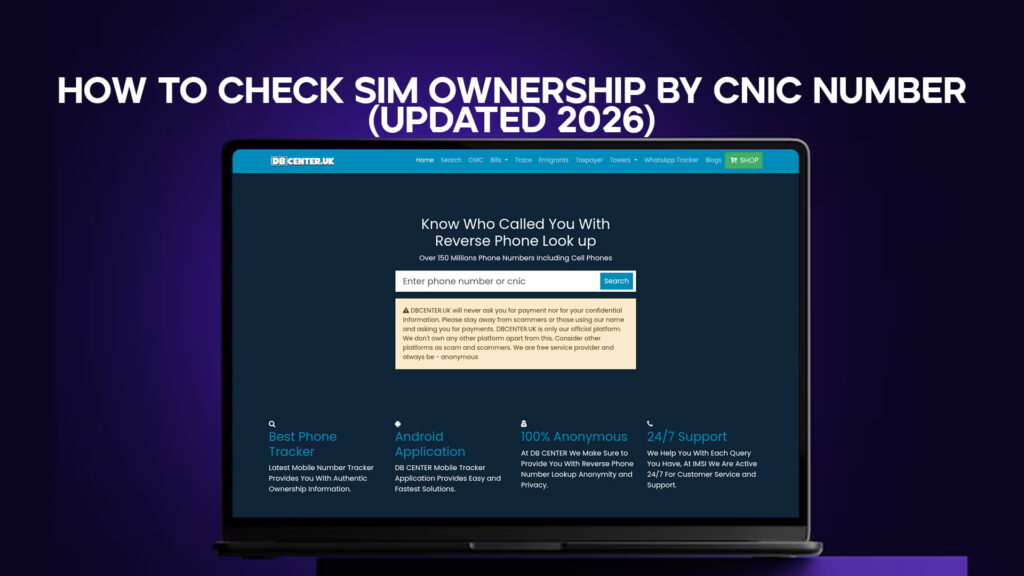
Beyond protecting your own identity, checking SIM ownership also serves a second purpose: identifying unknown numbers. If someone keeps calling you from a number you don’t recognize, you want to know who owns that SIM before you decide what to do about it. A reverse phone lookup through a service like DB Center, which covers over 150 million numbers including mobile numbers, gives you access to the registration data behind any number you need to investigate.
How SIM Registration Works in Pakistan
Before getting into the checking process, it’s worth understanding how the system is set up.
When a SIM card is purchased in Pakistan, the retailer is required to verify the buyer’s identity using their CNIC. The verification typically involves scanning the card through a biometric reader — a fingerprint — that confirms the buyer is the person named on the document. Once verified, the SIM is activated and officially registered under that CNIC in the Pakistan Telecommunication Authority’s database.
Each CNIC is allowed to have a maximum number of SIMs registered under it — a limit introduced specifically to prevent bulk fraudulent registrations. As of 2026, that limit is set to prevent any single identity from being linked to an excessive number of active lines.
In theory, this biometric requirement makes unauthorized registration very difficult. In practice, it still happens. Some retailers have been found to bypass verification steps, activate SIMs using stored or fabricated biometric data, or register SIMs during window periods when system checks are not functioning. The result is that fraudulent registrations still occur, even within a system designed to prevent them.
Understanding this helps explain why checking your own CNIC periodically is a necessary step, not just a one-time exercise.
Method One: Checking SIMs Registered Under Your Own CNIC
The most direct way to see which SIM cards are registered under your CNIC in Pakistan is through the PTA’s official SIM information service.
Using the SMS service. Send your 13-digit CNIC number (without dashes) to 668. The PTA’s system will send back a list of all active SIM cards currently registered under that identity number, along with the network they belong to. This service works from any active Pakistani mobile number.
The response typically comes within a few minutes. Review every number in that list carefully. If you see any that you don’t recognize — numbers on networks you’ve never used, or more lines than you’ve ever activated — those are your red flags.
What to do with unrecognized numbers. If you find SIM cards registered under your CNIC that you didn’t activate, don’t ignore them. Start by contacting the carrier that issued the unknown SIM. Each major Pakistani network — Jazz, Telenor, Zong, Ufone, SCO — has a customer service process for reporting unauthorized SIM registrations. Request immediate investigation and deactivation of any SIM you didn’t personally register.
Follow up by filing a formal complaint with the PTA. Their complaint portal accepts reports of unauthorized SIM registrations specifically. When filing, include your CNIC number, the unauthorized number or numbers, and as much context as you have about when you first noticed the issue.
If your physical CNIC was lost or stolen at some point, also notify NADRA. A compromised identity document that’s still in circulation is a continuing risk, and NADRA can flag your CNIC in their system.
How often should you check? At minimum, check your CNIC-linked SIMs once every three to six months. If you’ve ever lost your identity document, had it copied without your knowledge, or dealt with a suspicious call or SMS that referenced your identity, check immediately. Fraudulent SIM registrations often aren’t discovered for months or years simply because the person whose CNIC was used never thinks to look.
Method Two: Tracing the Owner of an Unknown Number
Checking your own CNIC covers your identity. But the second part of the picture — identifying who’s behind an unknown number — requires a different approach.
When an unknown number calls you, the question isn’t about your CNIC. It’s about whoever registered that specific mobile number. A reverse phone lookup tells you what’s in the public record and registered database for that number — the name, general address, carrier, and number type associated with the SIM card.
DB Center provides this through its search and trace tools, drawing from a database of over 150 million numbers that includes mobile lines alongside the landlines that most traditional directories focused on. The process is straightforward: you enter the number in full, including the country code, and the results come back quickly with whatever information is linked to that number in the database.
What a reverse lookup typically returns:
- The registered owner’s name, where available
- Carrier and network information
- Number type — mobile, landline, or VoIP
- Geographic location data based on the registration
- Community-reported flags for spam or scam activity
For numbers where a SIM has been registered under a real identity with consistent data, results are often detailed and reliable. For newer prepaid SIMs, virtual numbers, or SIMs registered under minimal information, results may be more limited — but even a partial result is informative. A number that returns as a VoIP line with no registered name tells you something important about its likely origin.
The trace tool for harder cases. Standard lookups return results quickly for the majority of numbers. For cases where the standard search comes back with limited data, the extended trace feature pulls from additional sources and often fills in gaps that the basic lookup doesn’t reach. If you’re dealing with a number that’s been calling repeatedly and you want a thorough check, the trace tool is the right option.
Reading the Results: What the Data Actually Tells You
Getting a lookup result back is only useful if you know how to read it. A few pointers:
Name with a carrier match. This is the cleanest result. A registered name alongside a carrier assignment for a normal mobile network generally means the SIM was legitimately issued. Whether or not you recognize the name is up to you to interpret.
VoIP or virtual number, no registered name. This pattern is common for scam operations. VoIP numbers are cheap to get, can be registered with minimal information, and are easy to discard after use. If a number that’s been calling you returns as VoIP with no owner data, treat it with significant caution.
Name on record but spam reports. Sometimes a number will return a legitimate-looking registration but also show multiple user-submitted spam reports. This can mean the original number has been taken over or is being spoofed, or that the registered owner is running a scam operation. The community reports are worth weighing alongside the formal registration data.
No result at all. A number that returns nothing in the database could be a very recently activated SIM, a number from an overseas carrier that isn’t in the database, or a heavily anonymized VoIP line. Absence of data isn’t the same as absence of risk.
The Connection Between CNIC Fraud and Unknown Number Calls
This might seem like two separate topics — checking your own CNIC registrations versus tracing unknown callers — but they’re more connected than they appear.
In many documented fraud cases, the same operation that registers SIMs fraudulently under stolen CNICs then uses those SIMs to place scam calls. The person whose CNIC was misused may never receive those calls directly — the SIM is being used to target other people. But if investigators trace the calling number, it leads back to the stolen CNIC.
This is why verifying CNIC-linked SIMs isn’t just about protecting yourself from incoming scams. It’s also about making sure your identity isn’t being used as the front for someone else’s fraud operation. The calls those fraudulent SIMs make go to other people. Those other people deserve to be able to look up who’s calling them — and the trail shouldn’t lead to an innocent person’s CNIC.
Checking both sides of this — your own CNIC and the numbers that contact you — closes the loop. You know what’s registered under your name. You know who’s behind numbers you don’t recognize. Both together give you a clearer and more complete picture than either does on its own.
Common Errors That Leave People Exposed
Most people who end up dealing with SIM fraud didn’t do anything obviously wrong. But a few gaps in habit tend to leave people more vulnerable:
Never checking CNIC-linked SIMs at all. The most common situation is simply not knowing the check exists. A significant portion of unauthorized SIM registrations go undetected for long periods purely because the person whose CNIC was used never thinks to look. Running the check costs nothing and takes about two minutes.
Losing a CNIC without reporting it. A lost identity card in the wrong hands is a liability. Reporting it to NADRA as soon as possible limits the window during which it can be misused for SIM registrations. Many people delay this, assuming the card will turn up.
Photocopying CNIC without watermarking. CNIC copies are required for all kinds of administrative processes in Pakistan — renting property, registering vehicles, opening bank accounts. If you’re providing a copy, writing “for [specific purpose] only” across it reduces the risk of it being misused for unrelated purposes, including SIM activation.
Calling back unknown numbers without checking. Returning a scam call confirms that your number is active, which makes you a target for follow-up attempts. The more productive response is to look up the number first, get the context you need, and then decide whether it’s worth engaging.
Assuming a familiar-looking caller ID means a familiar caller. Caller ID spoofing is straightforward and widely used. A number that appears to be a local or familiar format can be entirely fabricated. The only way to verify who’s actually behind a call is to look up the originating number — not to trust what appears on your screen.
Using DB Center as Part of Your Regular Verification Routine
DB Center is built for exactly this kind of lookup — fast, clear, accessible. With over 150 million phone numbers in its database, including the mobile numbers that older directory services didn’t cover, it handles the kinds of searches most people in mobile-first markets actually need.
For occasional checks — looking up a specific unknown number — the process is quick. For anyone who wants to build checking into a regular routine, the combination of the search tool and the trace feature covers the full range of lookup needs. The community reporting layer adds real-world context that formal registration data alone doesn’t always reflect.
The goal isn’t to become suspicious of every call you receive. It’s to have a reliable way to verify when something feels off — which, given the current state of phone-based fraud, is a reasonable tool for anyone to have available.
The easiest way is to use the PTA’s official SMS service. Send your 13-digit CNIC number (without dashes) to 668 from any active Pakistani mobile number. You will receive a reply listing all SIM cards currently registered under your identity, along with the network each one belongs to. Review the list carefully and report any numbers you don’t recognize to the relevant carrier and the PTA. DB Center can also be used to run a reverse lookup on any unfamiliar number from that list to get additional registration details.
Act quickly. First, contact the mobile carrier that issued the unauthorized SIM and request an immediate investigation and deactivation. Then file a formal complaint through the PTA’s official complaint portal, providing your CNIC number and the unauthorized mobile number. If you believe your identity document was lost or copied without your knowledge, also notify NADRA so they can flag your CNIC in their system. Catching and reporting unauthorized SIMs early limits the damage and reduces the risk of your identity being further misused.
Yes, in many cases. A reverse phone lookup through DB Center allows you to enter any mobile number and retrieve the registered owner’s name, carrier information, number type, and general location data linked to that SIM. For numbers where registration data is complete, results are typically detailed and returned within seconds. If a standard search returns limited information, the trace tool provides a more thorough lookup by pulling from additional data sources. DB Center’s database covers over 150 million numbers, including mobile numbers across Pakistan and internationally.
Yes, completely. Checking which SIM cards are registered under your own CNIC is not only legal — it is actively encouraged by the PTA and NADRA as a fraud prevention measure. Using a reverse phone lookup service like DB Center to identify the owner of an unknown mobile number is equally legal, as these services draw from publicly available records and registered data. The key principle is purpose: verifying your own identity information and identifying unknown callers are legitimate uses. Using the information to harass, threaten, or harm someone is not.
This typically happens through SIM fraud — a situation where a fraudster activates a SIM card using someone else’s CNIC without their consent. This can occur through corrupt or negligent retailers who bypass biometric verification steps, through stolen or copied identity documents, or through system vulnerabilities during the activation process. The SIM cards registered this way are then used for scam calls, financial fraud, or criminal communications, with the trail leading back to the innocent person’s CNIC. Regular checks through the PTA’s SMS service (668) are the most reliable way to detect these unauthorized registrations before they cause serious problems.
Final Thoughts
Two checks. That’s essentially what this comes down to.
Check what’s registered under your CNIC. Do it through the PTA’s SMS service, review the list carefully, and deal with anything unauthorized before it has time to cause damage. Make this a habit rather than a one-time event.
Check who owns any unknown number before you respond to it. Run it through DB Center, look at the registration data and community reports, and make an informed decision. For the vast majority of numbers people actually need to investigate, the information is available within seconds.
SIM fraud in 2026 is real, active, and affects more people than most realize. The checks described here are straightforward, legal, and take very little time. The cost of not doing them — particularly for CNIC misuse that goes undetected — is considerably higher than the time they take.